
Python Basic
Getting Started With Python
Introduction to Python
Understand what Python is and why it is important in cybersecurity and CTF environments.
What is Python?
Python is a high-level, interpreted programming language used for:
- Automation scripts
- Cybersecurity tools
- CTF challenge solving
- Web development
- Data processing
- Exploit development
Why Python in CTF?
Python is widely used in CTF because:
- Easy to write scripts quickly
- Powerful built-in libraries
- Great for automation
- Useful for file handling and networking
- Common in reverse engineering and exploitation tasks
What file extension is used for Python scripts?
What keyword do you use to display text to the user?
What is the name of the interactive mode where Python code is executed line by line?
What command-line symbol does the Python shell show?
What is the official website for Python documentation and downloads?
Which command shows the current version of Python installed on your system?
Python is a:
Which of the following is Python used for?
Python files use the .exe extension.
Who developed Python?
Python Syntax & Comments
Running Python Code & Basic Syntax
Python is a popular programming language known for its simple and readable syntax. Before writing programs, it is important to understand how to run Python code and follow basic syntax rules.
Running Python Code
There are multiple ways to run Python programs:
1. Interactive Mode
Interactive mode allows you to execute Python commands one by one and immediately see the output.
pythonExample:
>>> print("Hello World")
Hello World
2. Script File
Write Python code in a file with the .py extension and execute it from the terminal.
python script.pyExample (script.py):
print("Hello World")
Basic Syntax Rules
1. Python Uses Indentation
Indentation defines blocks of code. Python uses spaces or tabs instead of braces.
if True:
    print("Hello")
2. Python is Case-Sensitive
Variables and keywords must use the correct letter case.
name = "CTF"
print(name)      # Correct

# print(Name)    # Error
3. No Semicolon Required
Python statements do not require a semicolon at the end.
print("Hello")
print("Python")
4. Variables Do Not Require Type Declaration
Python automatically determines the data type of a variable.
name = "John"
age = 25
price = 99.99
Comments in Python
Comments are used to explain code and make programs easier to understand. Python supports both single-line and multi-line comments.
1. Single-Line Comment
Use the # symbol to create a single-line comment.
# This is a single-line comment
print("Hello World")
2. Multi-Line Comment
Triple quotes (''' or """) can be used for multi-line comments or documentation.
"""
This is a multi-line comment.
It can span multiple lines.
"""
print("Hello World")
Python Keywords
Keywords are reserved words in Python and cannot be used as variable names.
if
else
for
while
def
return
class
import
Output in Python
The print() function is used to display output on the screen.
print("Welcome to Python")
print(100)
Output:
Welcome to Python
100
CTF Example
The following example prints a sample CTF flag:
# Printing a flag
flag = "CTF{example_flag}"
print(flag)

"""
This flag is used
for demonstration purposes
in a CTF challenge.
"""
Summary
- Python code can be executed in Interactive Mode or through Script Files.
- Python uses indentation to define code blocks.
- Python is case-sensitive.
- Semicolons are not required.
- Comments help document and explain code.
- The
print()function is used to display output.
What feature does Python use to define code blocks?
Which command executes a Python script?
Python automatically determines variable data types.
Which symbol is used to write a single-line comment in Python?
Which comment style is used for multiple lines?
Which function displays output on the screen?
Which of the following is a Python keyword?
Python requires a semicolon at the end of every statement.
What will be printed?
print("Hello")
Comments are ignored during program execution.
Variables in Python
Variables in Python
Variables are containers used to store data in a program. They allow us to save information and use it later whenever needed.
Think of a variable as a labeled box where you can store a value such as a name, number, or text.
name = "Alice"      # String
age = 25            # Integer
score = 98.5        # Float
Why are Variables Important?
Variables help programmers to:
-
Store data for later use
-
Perform calculations
-
Manage user input
-
Build dynamic applications
-
Automate tasks in cybersecurity and CTF challenges
In a CTF challenge, variables can store:
-
Flags
-
IP Addresses
-
Usernames
-
Passwords
-
Encrypted Data
Variable Naming Rules
When creating variables, follow these rules:
Valid Rules
-
Must begin with a letter or underscore (
_) -
Can contain letters, numbers, and underscores
-
Variable names are case-sensitive
-
Cannot be a reserved keyword
username = "admin"
_age = 20
user1 = "John"
Invalid Variable Names
The following variable names are not allowed:
1user = "John"
user name = "John"
class = "Python"
Why?
-
Variables cannot start with numbers.
-
Spaces are not allowed.
-
Python keywords cannot be used as variable names.
Case Sensitivity
Python treats uppercase and lowercase letters differently.
name = "Alice"
Name = "Bob"
Both variables are different because Python is case-sensitive.
Assigning Multiple Variables
You can assign values to multiple variables in a single line.
x, y, z = 10, 20, 30
Assigning the Same Value
You can assign the same value to multiple variables.
a = b = c = 100
Summary
-
Variables are used to store data.
-
Python creates variables automatically when values are assigned.
-
Variable names must follow specific rules.
-
Python is case-sensitive.
-
Variables are widely used in scripting, automation, and CTF challenges.
Which operator do you use to store data in a variable?
Which of the following is a valid variable name?
Question4.
What will be the output of the following code?
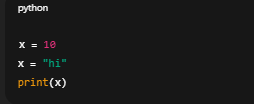
Which symbol can be used at the beginning of a variable name?
Which of the following is not a valid variable name in Python?
Which statement creates a variable?
name and Name are different variables.
What does the following create?

Variable names can contain spaces.
Is _username a valid variable name?
Python Operators
Operators in Python
Operators are special symbols or keywords used to perform operations on values and variables. They help Python perform calculations, compare values, assign data, and evaluate conditions.
b = 20
print(a+b)
print(a-b)
Key Concept
In the expression 10 + 3, 10 and 3 are called operands, and + is called the operator. The operator tells Python what action to perform on the operands.
Types of Operators
| Operator Type | Purpose |
|---|---|
| Arithmetic Operators | Perform mathematical calculations |
| Comparison Operators | Compare two values |
| Logical Operators | Combine multiple conditions |
| Assignment Operators | Assign and update values |
| Membership Operators | Check whether a value exists in a sequence |
| Identity Operators | Compare object identity |
| Bitwise Operators | Perform operations on binary values |
1. Arithmetic Operators
Arithmetic operators are used to perform mathematical calculations.
| Operator | Description |
|---|---|
| + | Addition |
| - | Subtraction |
| * | Multiplication |
| / | Division |
| % | Modulus / Remainder |
| ** | Exponent / Power |
| // | Floor Division |
b = 20
print(a + b)
print(a - b)
print(a * b)
print(a / b)
print(a % b)
print(a ** b)
print(a // b)
2. Comparison Operators
Comparison operators compare two values and return either True or False.
| Operator | Description |
|---|---|
| == | Equal To |
| != | Not Equal To |
| > | Greater Than |
| < | Less Than |
| >= | Greater Than or Equal To |
| <= | Less Than or Equal To |
b = 20
print(a > b)
print(a < b)
print(a == b)
print(a != b)
3. Logical Operators
Logical operators are used to combine multiple conditions.
| Operator | Description |
|---|---|
| and | Returns True if both conditions are True |
| or | Returns True if at least one condition is True |
| not | Reverses the result |
b = 5
print(a > 5 and b > 2)
print(a > 20 or b > 2)
print(not(a == b))
4. Assignment Operators
Assignment operators are used to assign and update values.
| Operator | Example |
|---|---|
| = | x = 5 |
| += | x += 2 |
| -= | x -= 2 |
| *= | x *= 2 |
| /= | x /= 2 |
| %= | x %= 2 |
count += 2
count -= 1
count *= 3
print(count)
5. Membership Operators
Membership operators check whether a value exists in a sequence such as a string, list, or tuple.
| Operator | Description |
|---|---|
| in | Returns True if value exists |
| not in | Returns True if value does not exist |
print(80 in ports)
print(25 not in ports)
6. Identity Operators
Identity operators compare whether two variables refer to the same object.
| Operator | Description |
|---|---|
| is | Returns True if both objects are the same |
| is not | Returns True if both objects are different |
print(a is b)
print(a is not b)
7. Bitwise Operators
Bitwise operators perform operations on binary values.
| Operator | Description |
|---|---|
| & | Bitwise AND |
| | | Bitwise OR |
| ^ | Bitwise XOR |
| ~ | Bitwise NOT |
| << | Left Shift |
| >> | Right Shift |
b = 5
print(a & b )
print(a | b)
print(a ^ b)
Why are Operators Important?
Operators are used in almost every Python program. They help developers:
- Perform calculations
- Compare values
- Make decisions
- Create conditions
- Control loops
- Process user input
- Build automation scripts
In cybersecurity and CTF challenges, operators are frequently used to validate data, compare flags, process inputs, and automate repetitive tasks.
Summary
- Operators perform actions on variables and values.
- Python provides different categories of operators.
- Arithmetic operators perform calculations.
- Comparison operators return True or False.
- Logical operators combine conditions.
- Assignment operators update variable values.
- Membership operators check values inside sequences.
- Identity operators compare object identity.
- Bitwise operators work with binary data.
What operator is used for exponentiation (e.g., 2²)?
What does 10 % 3 return?
Which of the following expressions will return True?
a) 10 == '10'
b) 10 != 5
c) 3 > 5
d) 7 < 7
What is the output of this expression:
True or False and False ?
Which operator is used to compare identities?
What is the output of 3 + 5 * 2?
Which operator is used to check inequality?
Which assignment operator increases a value?
What is the output?
a += 3
print(a)
Which operator category does = belong to?