
Mobile Pentesting - L2
The Case of the Insecure Task Manager
This assessment follows a structured approach to testing TaskPro.apk, an Android application, using a combination of static analysis, dynamic analysis, and exploitation techniques. Each phase highlights key findings and the methods used to uncover them.
Phase 1: Static Analysis – Initial Reconnaissance
The initial step involved static analysis using MobSF, a powerful tool for analyzing APKs without executing them. After uploading TaskPro.apk, the report flagged critical security issues, including:
Application is debuggable, making it vulnerable to runtime debugging.
Exported Activity ( com.taskpro.AdminActivity ) was accessible to other applications without authentication.
A Firebase database URL was found in strings.xml:

To assess the Firebase security rules, a direct query revealed:
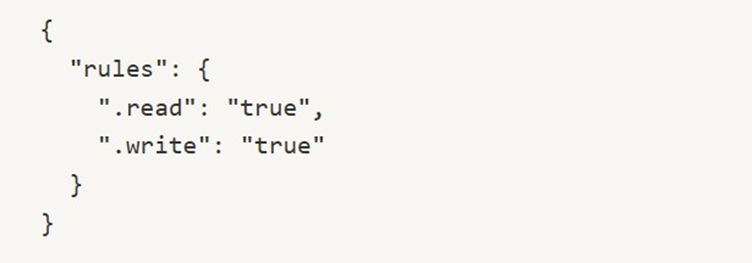
This misconfiguration allowed unauthenticated read and write access, meaning any attacker could retrieve or modify stored data.
Further investigation using Jadx, a decompiler for analyzing APK contents, exposed hardcoded credentials in DatabaseHelper.java :

Storing plaintext credentials in the application code is a critical vulnerability, as attackers can easily extract and exploit them.
Phase 2: Dynamic Analysis – Running the Application
To test the applicationʼs runtime behavior, Genymotion, an Android emulator, was used. The application was installed and executed while monitoring logs for sensitive information leaks.
Drozer, a security assessment framework, was then employed to analyze exported components. Listing the available activities:

The AdminActivity was confirmed to be exported. Manually launching it without authentication:

The admin panel opened without requiring credentials, indicating an access control flaw.
For network traffic interception, Burp Suite was used. However, the application implemented SSL pinning, preventing interception. To bypass this, Frida, a dynamic instrumentation toolkit, was deployed:

With SSL pinning disabled, Burp Suite successfully intercepted HTTPS traffic. Observations included:
User emails and hashed passwords were leaked via API responses from
/api/tasks.
The application did not validate SSL certificates, making it vulnerable to
Man-in-the-Middle (MitM) attacks.
Phase 3: Obfuscation & Reversing Code Protection
To determine the level of code obfuscation, APKiD was used:

Results showed that ProGuard obfuscation was applied, making the decompiled code harder to analyze.
To reverse the obfuscation, the APK was processed through DeGuard, which reconstructed the original logic. Among the findings was an insecure AES encryption method in PaymentProcessor.java :

Using ECB (Electronic Codebook) mode for encryption is unsafe because it produces predictable ciphertexts, making data more vulnerable to analysis and attacks.
Phase 4: UI-Based Attacks
To identify user interface security flaws, Qark, a security analysis tool, was used. It flagged SettingsActivity as vulnerable to tapjacking, an attack where an invisible overlay tricks users into granting permissions unknowingly.
A proof-of-concept (PoC) APK was generated to exploit this issue:

When installed and executed, the overlay placed an invisible button over the "Grant Permissions" UI. A simple tap resulted in camera access being granted without user awareness.
Another security issue was identified in the deep link schema found in AndroidManifest.xml:
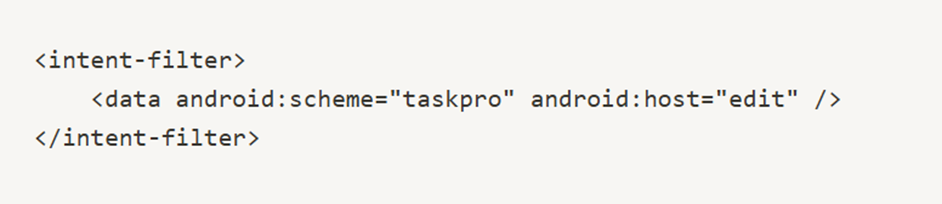
Using ADB, deep links were tested:

This opened a task editor, which raised concerns about potential parameter tampering. Modifying the deep link with a traversal attack:

Resulted in SharedPreferences data being exposed, revealing sensitive configurations stored on the device.
Phase 5: Database & Content Provider Attacks
To examine how the application stored and exposed data, Drozer was used to identify Content Provider vulnerabilities:

The provider content://com.taskpro.tasks/content was found to be
unprotected. Testing for SQL injection:

This query successfully dumped user credentials, API keys, and other
sensitive data, confirming SQL injection vulnerability in the Content Provider.
Question 1.
Which tool was used for static analysis of TaskPro.apk to identify security vulnerabilities without executing the application?
Question 2.
What flag in the AndroidManifest.xml allows an application to be debugged at runtime?
Question 3.
Which tool was used to decompile the APK and extract hardcoded credentials from the source code?
Question 4.
What is the main security risk associated with storing credentials in source code?
Question 5.
Which testing framework was used to analyze exported activities and content providers dynamically?
Question 6.
Which attack was demonstrated by launching an exported activity without authentication?
Question 7.
Which tool was used to bypass SSL pinning in TaskPro.apk?
Question 8.
Which attack occurs when an application does not validate SSL certificates, making it vulnerable to interception?
Question 9.
What obfuscation technique was identified in the APK to make reverse engineering more difficult?
Question 10.
Which cryptographic mode was used in the TaskPro.apk that made AES encryption insecure?
Question 11.
Which tool was used to detect UI vulnerabilities such as tapjacking in TaskPro.apk?
Question 12.
What security flaw allows an attacker to use an invisible overlay to trick users into granting permissions?
Question 13.
Which Android component was tested for parameter tampering via deep links?
Question 14.
What vulnerability was exploited using an SQL injection attack on the Content Provider?
Question 15.
Which command-line tool was used to test deep links and interact with Android activities?
Question 16.
Which security risk occurs when an app exposes Firebase database access without authentication?
Question 17.
Which type of attack allows unauthorized modification or retrieval of data due to poor Firebase rules?
Question 18.
What Android storage mechanism was accessed using deep link traversal to reveal sensitive configurations?
Question 19.
What attack vector was used to inject unauthorized SQL queries into the Content Provider?